How to Register on SwapLance as a Client
Welcome to SwapLance, a global platform where you can connect with a wide range of professional freelancers ready to bring your projects to life.
Registering as a client is straightforward and provides you with access to a multitude of services.
Before You Start
Before we dive into the registration process, ensure you have the following details ready: a unique username, a valid email address, and a secure password.
Please ensure you are using a browser that SwapLance supports, such as Chrome, Firefox, Safari, or Edge, to guarantee a seamless experience.
Step-by-Step Registration Guide
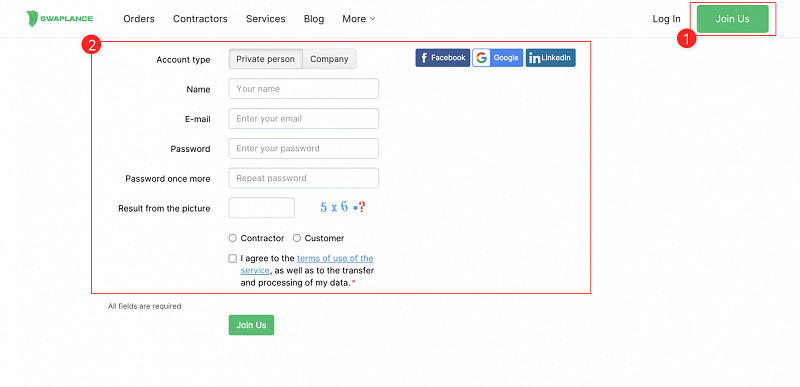
Click the 'Join Us' Button: Locate the 'Join Us' button typically found on the top right corner of the homepage.
Choose 'I'm Hiring (For a Project or Company)': You will be presented with two options: «I'm Hiring (For a Project or Company)» and «I'm Working (As a Freelancer or Company)». Choose the first option.
Fill Out the Registration Form: You will need to input the following information:
Choose Account type: If you are registering on your own behalf, select «Private person», if you are registering on behalf of a company, select «Company».
Name: Write your first and last name or company name.
Email Address: Enter a valid email address. You'll need this for account verification and notifications.
Password: Create a strong password to secure your account.
Complete the Verification Step: After you have filled out the necessary information, you will need to verify your email address. Check your inbox for a verification email from SwapLance and click on the confirmation link.
Completing Your Profile
After successfully registering, it's important to complete your profile. This increases your credibility and allows freelancers to understand your needs better.
- Add a Profile Picture: Choose a professional image or your company logo.
- Set Up Contact Details: These may include your time zone, preferred contact method, etc.
Navigating Your Dashboard
After completing registration and setting up your profile, you will be taken to your page in the «Orders» section. This is your personal space where you can post jobs, communicate with freelancers, manage your projects and much more.
Next Steps After Registration
Now that you are registered, you can post your first project.
Use the «Add Order» button on your Orders profile page and fill in the project details. You can also browse the extensive list of talented freelancers and start your journey towards successful project completion.
FAQs
- Is the registration free? Yes, registering as a client on SwapLance is absolutely free.
- I did not receive the confirmation email. What should I do? Please check your spam or junk folder. If you still can't find the confirmation email, contact our support team at [email protected].
Getting Help
If you encounter any difficulties during registration or have further questions, please contact our support team. We're here to help!
That's it! You've successfully registered as a client on SwapLance and are one step closer to achieving your project goals.